TechKitty

Typing the same
details twice?

I build websites, apps and tools for everyday problems. Bring me the receipts your family sorts by hand, the list your club keeps retyping, or an idea for your shop.

Book a free consultation Choose 30 or 60 minutes. By video or in person by arrangement. Get a recap and clear next steps.See what I can build See what I built for my grandma
Meet the real Kali

Enter a name or address once. Use it again wherever you need it.

Kali’s scratchpad.

Drag the yarn or tap a key.

A family project

Receipt Desk for my grandma

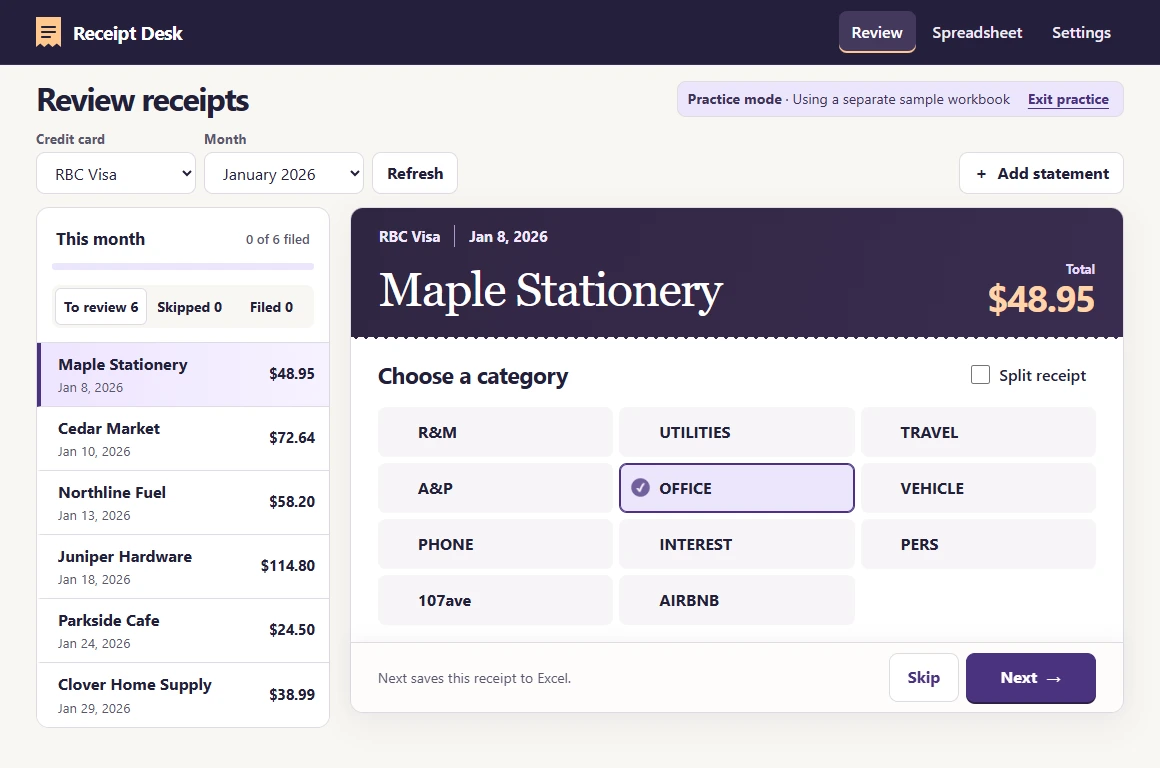
My grandma tracks her credit card purchases in Excel for her accountant. I built Receipt Desk around the workbook she already knows. She can review one purchase at a time, choose a category and press Next to put the amount in the right column.

Follow one purchase into the spreadsheet

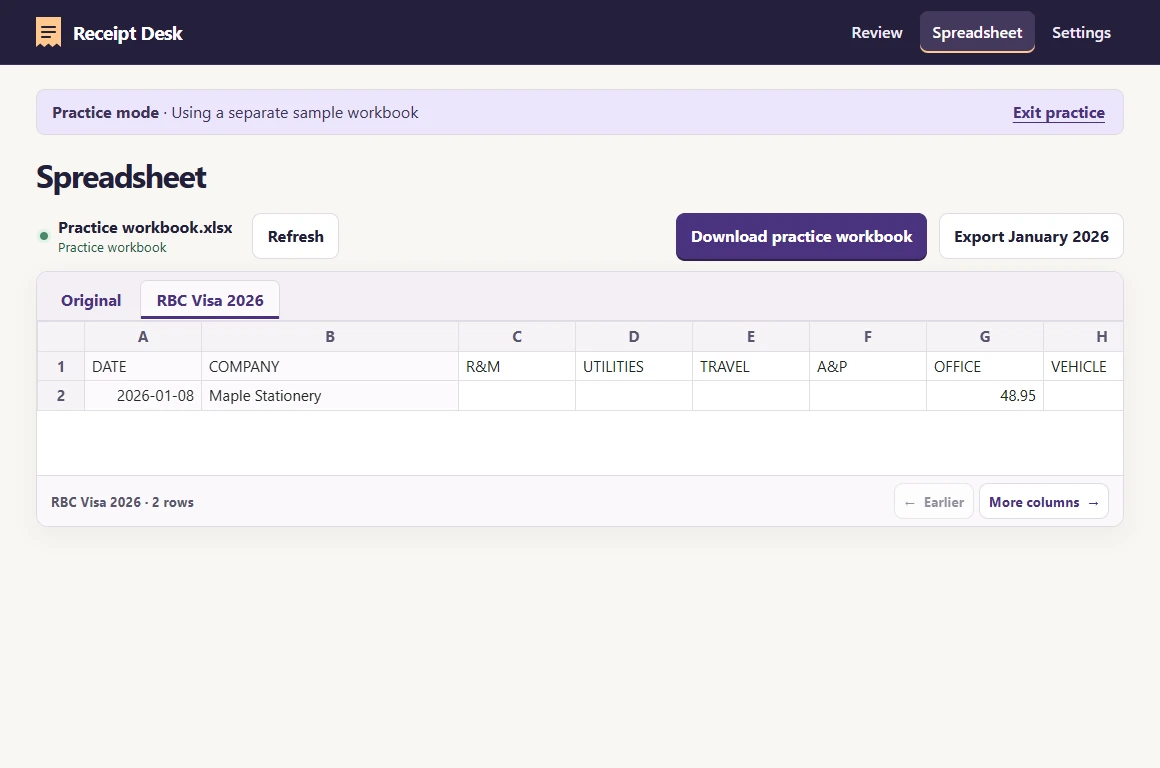
These two screens use a practice workbook. In this example, a $48.95 stationery purchase belongs under Office.

Receipt Desk shows the $48.95 Maple Stationery purchase with Office selected.
First she checks the purchase and chooses Office. She can also split a purchase or skip it and come back later.
The Excel worksheet shows 48.95 in the Office column for Maple Stationery.
Next puts the $48.95 in the Office column of the card’s worksheet.
What else can Jon build?

I’ve built websites, contact and follow-up tools, email systems and scheduling tools. I also work with databases, connect software using AI when it helps, and create marketing materials and social media content.

See more of my work

Selected work

About Jon ↓

I start by learning how you do the work today. That habit goes back to my years in logistics, working with spreadsheets, databases and forecasts. See how I used it to build Receipt Desk.

  • Websites

    I’ve worked on public sites for a community initiative and a glassworks business.

  • Public outreach and sign-up forms

    I worked on an online form that makes it easier for people to respond to outreach and share their information.

  • Social media reels

    I worked on a tool that searches longer content, picks promising moments and animates them into short clips.

  • Team updates and reporting

    I worked on a tool that gives a team one place for updates and reports.

  • Research reports and slides

    I helped put research into reports and slides people could read and present.

  • Technical licensing documentation

    I prepared a detailed written response to a government regulator’s request for information during a licensing process.

About Jon

I studied business at university, then spent more than a decade in corporate oil and gas. I learned logistics, worked with spreadsheets and databases, and got to know modelling and forecasting.

I left corporate work to learn more about nature, permaculture, building, and design. I’ve spent more than three years learning about AI, and in the past year I’ve focused on using it to write code and build systems.

TechKitty brings those parts of my life together. I build websites, apps, and tools for the way you work, whether you’re running a small business or bringing a project of your own to life.

Your consultation

What would you
like to change?

We’ll have a conversation about your project. I’ll ask what you’re trying to do, what’s getting in the way, and what you’d be happy to see at the end. By the end of the free call, we’ll have enough to make a plan.

What to bring. Come ready to talk about your project. Bring anything that helps show what success looks like to you. That might be a website you like, an app or program you’ve used, or a book, course, or other reference that explains what you want to do. A link, screenshot, or title is plenty.

After we meet, I’ll send a recap of what we discussed and options you can take forward. You can correct anything I missed and choose what you’d like quoted.

Quotes are tailored to the scope and your budget.

How we’d work together

  1. Talk through the project. Show me what you do today and what you want to change. A reference or a made-up example helps.
  2. Make a plan. We’ll decide what a useful first version should do and what it needs to work with.
  3. Review the quote. If you want to proceed, we’ll agree on the work, timing, handover and any ongoing costs before paid work starts.
How long might it take?

Timing depends on what the first version needs to do and which existing tools it must work with. The quote spells out the scope and expected timing.

What happens after launch?

We’ll discuss who needs access, which files or accounts are handed over, and what support you want. I’ll spell out what we agree to in the quote.

What about cost, my current tools, or private information?

We can start with a made-up example. Leave out names, passwords and private records.

Tell me which tools you want to keep. We’ll check what can work together. If you ask for a quote, we’ll agree on what the build covers, what fits your budget, and any ongoing costs or support.

Book a free consultation ↗

Prefer email? Email Jon to arrange a time.

Fictional consultation reportNorthbank Tool LibraryExplore the sample ↗

Book a free consultation

Choose 30 minutes to talk through one task or idea. Choose 60 if you want to map several steps or compare options. Book a video call, or email Jon to arrange a video or in-person meeting.

Have an example of what you want to accomplish? Bring a link, screenshot, or the name of a book or course to the call.

See video times ↗

Email jon.sedore@gmail.com.